


BEAM
A powerful solution for creating BIM elements in Rhino and transferring them to Revit or IFC
Definition
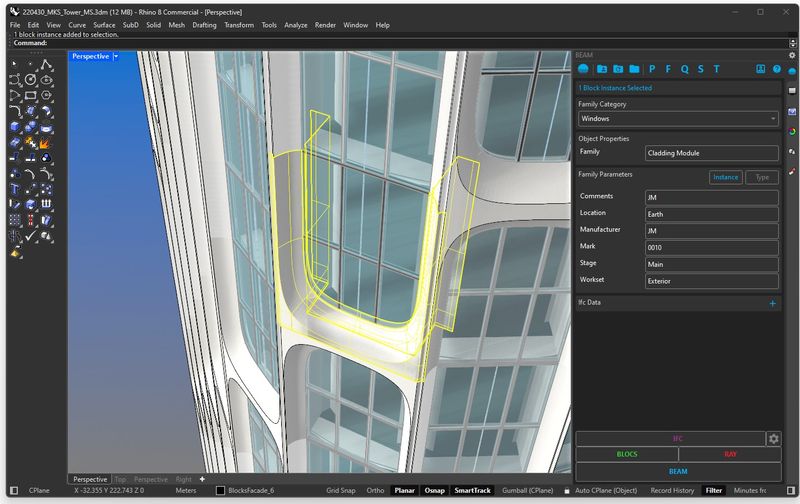
BEAM is the go-to solution for architects, engineers, and designers to seamlessly create BIM elements in Rhino and transfer them to Revit or IFC—eliminating the hassle of complex workflows.BEAM: Enhance Your BIM ModelingBring the power of Building Information Modeling (BIM) to Rhino® with BEAM. Extend Rhino geometry with BIM data and export to Autodesk® Revit™ or IFC 4.With BEAM, you can deliver your designs to the digital era of BIM, streamlining your workflows and improving the efficiency of your projects.
In Depth
BEAM (Building Environment Assessment Method) provides building sustainability certification in certain markets. AI assists with the certification documentation and credit tracking, similar to LEED and BREEAM automation.
Tool Details
BEAM LITE: The Basic BEAM Experience
BEAM PRO: The Complete BEAM Experience
More than 30 days
United Kingdom
Examples
Using BEAM for BIM modeling and coordination
Nomic Use Cases
See how Nomic applies this in production AEC workflows:
Frequently Asked Questions
BEAM is the go-to solution for architects, engineers, and designers to seamlessly create BIM elements in Rhino and transfer them to Revit or IFC—eliminating the hassle of complex workflows.BEAM: Enhance Your BIM ModelingBring the power of Building Information Modeling (BIM) to Rhino® with BEAM. Extend Rhino geometry with BIM data and export to Autodesk® Revit™ or IFC 4.With BEAM, you can deliver your designs to the digital era of BIM, streamlining your workflows and improving the efficiency of your projects.
Using BEAM for BIM modeling and coordination.
Project Research: Instantly access all project-critical information from a single search interface.