


BIMLOGiQ
Generative AI Revit Plug-Ins including “Smart Annotation”, “Smart Schematics” and “BIMLOGIQ Co-pilot”
Definition
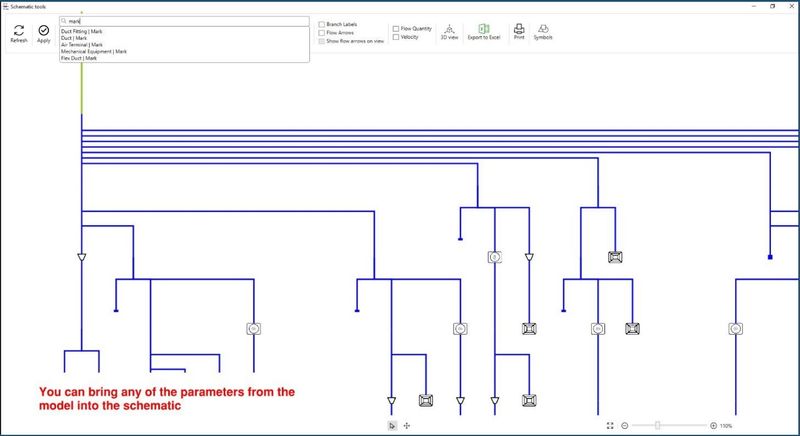
BIMLOGIQ offers AI-powered tools, including “Smart Annotation” for enhanced Revit documentation, “Smart Schematics” for easy 2D drawing creation from 3D models, and a forthcoming “BIMLOGIQ Co-pilot” generative AI tool for seamless interaction with Revit, marking a significant leap in user-friendly design and functionality.
In Depth
BIMLOGiQ uses AI for BIM logistics and material management, optimizing the delivery and placement of building materials on construction sites. The platform connects the BIM model to the supply chain, enabling just-in-time material delivery to the point of installation.
Tool Details
More than 30 days
Examples
Using BIMLOGiQ for BIM modeling and coordination
Creating and editing drawings with BIMLOGiQ
Nomic Use Cases
See how Nomic applies this in production AEC workflows:
Frequently Asked Questions
BIMLOGIQ offers AI-powered tools, including “Smart Annotation” for enhanced Revit documentation, “Smart Schematics” for easy 2D drawing creation from 3D models, and a forthcoming “BIMLOGIQ Co-pilot” generative AI tool for seamless interaction with Revit, marking a significant leap in user-friendly design and functionality.
Using BIMLOGiQ for BIM modeling and coordination. Creating and editing drawings with BIMLOGiQ.
Project Research: Instantly access all project-critical information from a single search interface. Automated Drawing Review: Automatically review drawings against building codes, internal standards, and client requirements.