


Maestro
Maestro is your automation specialist, helping firms create and share tools that break down innovation silos within their teams.
Definition
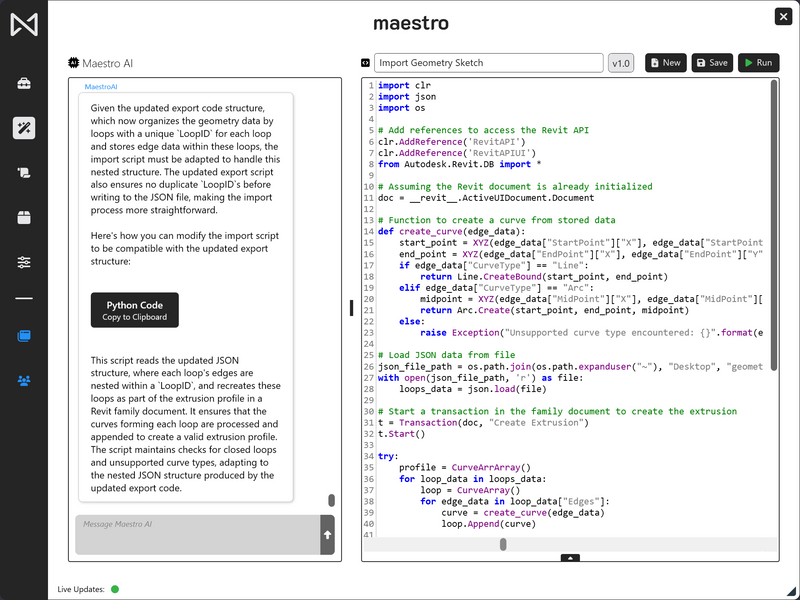
Maestro is an AI-powered automation platform designed to enhance efficiency and collaboration within Architecture, Engineering, and Construction (AEC) firms. By integrating seamlessly with Autodesk Revit, Maestro offers a suite of tools that streamline repetitive tasks, facilitate code deployment, and promote team-wide productivity. Key Features:• Revit Ribbon Manager: Maestro introduces a customizable ribbon interface within Revit, allowing users to tailor their workspace with frequently used tools and scripts. This personalization accelerates workflow and reduces time spent navigating through menus.• Integrated Python IDE: With its built-in Python Integrated Development Environment (IDE), Maestro empowers users to write, test, and deploy scripts directly within the platform. This feature simplifies the automation of complex tasks and enhances scripting capabilities without the need for external applications. • AI-Driven Automation: Leveraging artificial intelligence, Maestro automate
In Depth
Maestro provides construction project management. AI enhances the platform with document intelligence and automated workflow capabilities.
Tool Details
More than 30 days
United States
Examples
Key Features:• Revit Ribbon Manager: Maestro introduces a customizable ribbon interface within Revit, allowing users to tailor their workspace with frequently used tools and scripts
• Scalability: Maestro's modular design allows it to adapt to firms of various sizes, making it a versatile solution for both small teams and large organizations
Nomic Use Cases
See how Nomic applies this in production AEC workflows:
Frequently Asked Questions
Maestro is an AI-powered automation platform designed to enhance efficiency and collaboration within Architecture, Engineering, and Construction (AEC) firms. By integrating seamlessly with Autodesk Revit, Maestro offers a suite of tools that streamline repetitive tasks, facilitate code deployment, and promote team-wide productivity. Key Features:• Revit Ribbon Manager: Maestro introduces a customizable ribbon interface within Revit, allowing users to tailor their workspace with frequently used tools and scripts. This personalization accelerates workflow and reduces time spent navigating through menus.• Integrated Python IDE: With its built-in Python Integrated Development Environment (IDE), Maestro empowers users to write, test, and deploy scripts directly within the platform. This feature simplifies the automation of complex tasks and enhances scripting capabilities without the need for external applications. • AI-Driven Automation: Leveraging artificial intelligence, Maestro automate
Key Features:• Revit Ribbon Manager: Maestro introduces a customizable ribbon interface within Revit, allowing users to tailor their workspace with frequently used tools and scripts. • Scalability: Maestro's modular design allows it to adapt to firms of various sizes, making it a versatile solution for both small teams and large organizations.
Project Research: Instantly access all project-critical information from a single search interface.