


Skema for SketchUp
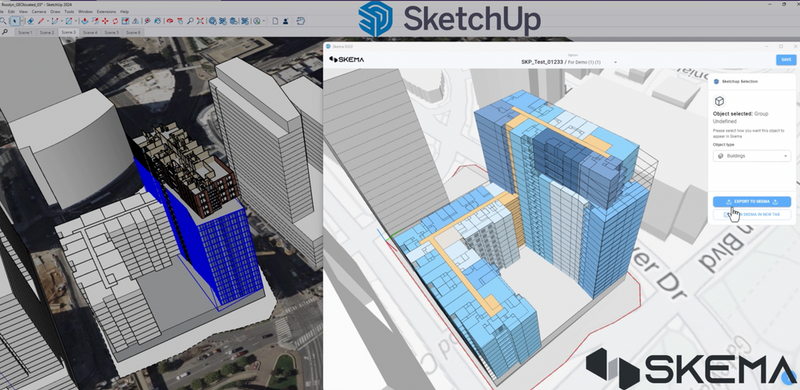
Skema for SketchUp is an extension that delivers serious BIM with SketchUp ease. Designers start massing in SketchUp, move seamlessly into Skema for sophisticated block-and-stack planning, and return to SketchUp for design exploration of facades, rendering, etc.
Definition
The Skema for SketchUp design automation solution is designed for every designer who begins their work in SketchUp and completes their deliverables in Revit. This integration offers a seamless way to leverage SketchUp’s early design capabilities to drive Building Information Modeling (BIM) workflows and Revit deliverables. By facilitating a smoother flow of data between both tools, Skema offers a start to finish workflow that simplifies a typically complex process, allowing firms to work more efficiently and confidently -- saving up to two months on each project.Skema is the tool you need to move fluidly between SketchUp and Revit. With Skema, you can repurpose your past solved designs, generate schematic designs, and export detailed BIM—without the hassle of coding, scripting, or remodeling. .Advantages:1. Generate Smart, No-Code Schematic DesignsGet a head start with Skema’s auto-layout blocking and stacking. Easily customize from there to get faster, smarter schematics. Start in Ske
In Depth
Skema for SketchUp brings parametric design tools to SketchUp users. AI provides real-time design analysis during the conceptual modeling process.
Tool Details
Skema for SketchUp Companion License (limited time)
Yes, 7 days
United States
Examples
Using Skema for SketchUp for BIM modeling and coordination
Creating and editing drawings with Skema for SketchUp
Nomic Use Cases
See how Nomic applies this in production AEC workflows:
Frequently Asked Questions
The Skema for SketchUp design automation solution is designed for every designer who begins their work in SketchUp and completes their deliverables in Revit. This integration offers a seamless way to leverage SketchUp’s early design capabilities to drive Building Information Modeling (BIM) workflows and Revit deliverables. By facilitating a smoother flow of data between both tools, Skema offers a start to finish workflow that simplifies a typically complex process, allowing firms to work more efficiently and confidently -- saving up to two months on each project.Skema is the tool you need to move fluidly between SketchUp and Revit. With Skema, you can repurpose your past solved designs, generate schematic designs, and export detailed BIM—without the hassle of coding, scripting, or remodeling. .Advantages:1. Generate Smart, No-Code Schematic DesignsGet a head start with Skema’s auto-layout blocking and stacking. Easily customize from there to get faster, smarter schematics. Start in Ske
Using Skema for SketchUp for BIM modeling and coordination. Creating and editing drawings with Skema for SketchUp.
Project Research: Instantly access all project-critical information from a single search interface. Automated Drawing Review: Automatically review drawings against building codes, internal standards, and client requirements.