


Solibri CheckPoint
Solibri CheckPoint is an easy-to-use, cloud based model checking solution for Revit and IFC models that seamlessly connects with ACC or Procore. Plug and play to run automatic model checking within minutes.
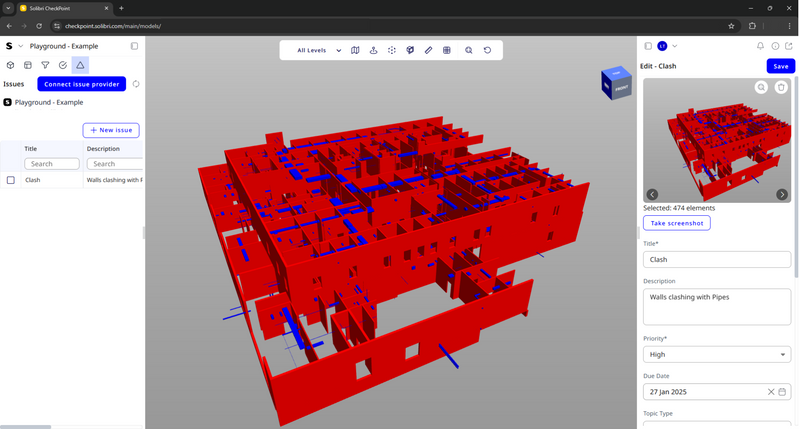
Definition
Solibri CheckPoint is a browser-based BIM model checking platform that helps architecture, engineering, and construction teams improve model quality, coordination, and compliance—without heavy installs or steep training. Open a browser, review Revit and IFC models side by side, run standardized QA/QC checks (clash detection, data/property rules, clearances), and manage issues in one collaborative workspace that fits your existing CDE and project tools. Why Solibri CheckPoint Zero install, fast adoption: Web-based model checking reduces IT overhead and speeds onboarding. Native Revit & IFC support: Review the same source data—no exports or lossy conversions. Standardized QA/QC: Enforce modeling standards with reusable rule sets, filters, and data views. Collaborative issue management: Assign, track, and resolve clashes/data issues with transparent audit trails. CDE-friendly: Practical integrations with Autodesk Construction Cloud and Procore keep models and issues in sync via direct con
In Depth
Solibri CheckPoint provides cloud-based BIM quality checking. AI automates the model quality verification process for teams that need checking without the full Solibri desktop application.
Tool Details
Floating License
Finland
Examples
Using Solibri CheckPoint for BIM modeling and coordination
Nomic Use Cases
See how Nomic applies this in production AEC workflows:
Frequently Asked Questions
Solibri CheckPoint is a browser-based BIM model checking platform that helps architecture, engineering, and construction teams improve model quality, coordination, and compliance—without heavy installs or steep training. Open a browser, review Revit and IFC models side by side, run standardized QA/QC checks (clash detection, data/property rules, clearances), and manage issues in one collaborative workspace that fits your existing CDE and project tools. Why Solibri CheckPoint Zero install, fast adoption: Web-based model checking reduces IT overhead and speeds onboarding. Native Revit & IFC support: Review the same source data—no exports or lossy conversions. Standardized QA/QC: Enforce modeling standards with reusable rule sets, filters, and data views. Collaborative issue management: Assign, track, and resolve clashes/data issues with transparent audit trails. CDE-friendly: Practical integrations with Autodesk Construction Cloud and Procore keep models and issues in sync via direct con
Using Solibri CheckPoint for BIM modeling and coordination.
Project Research: Instantly access all project-critical information from a single search interface. Automated Drawing Review: Automatically review drawings against building codes, internal standards, and client requirements.