


D.TO (Design TOgether)
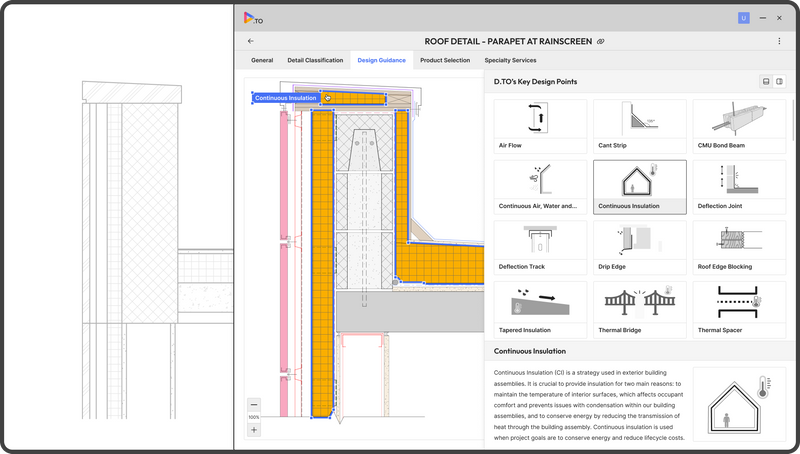
D.TO provides visual diagrams and design guidance descriptions depicting ideal design solutions for classified design problems. This feature offers design professionals instant dynamic access to design starting points, ensuring better design outcomes.
Definition
What D·TO does D·TO delivers visual diagrams and practical design guidance that illustrate ideal building-assembly solutions for classified design problems. These ready-to-use starting points help architects and AEC professionals avoid rework and produce higher-quality outcomes faster. How it works Patented algorithm recommends high-quality assembly designs based on real-world architectural expertise. Visual diagrams, text-based guidelines, and certified drawing examples act as virtual mentors. On-demand listings surface suitable products and specialty services tailored to project parameters. Core features Visual design diagrams and mentoring. Detailed building-science backgrounds and textured guidance. Certified drawing examples for direct application in projects. Smart product search with filters (price, sustainability, reviews). BIM add-ins for model integration and session management. For architects (key tools) BIM integration and installation support. Project & desig
In Depth
D.TO (Design TOgether) enables collaborative architectural design. AI enhances real-time collaboration by providing design intelligence as multiple team members work simultaneously.
Tool Details
Free
United States
Examples
Integrations & workflow Integrates with common BIM models and supports export-ready drawing examples
Supports multi-objective optimization to align design decisions with cost, sustainability, and performance goals
Whether used for early design, detailed drawings, or specification management, D·TO streamlines decision-making so teams deliver better projects—faster
Nomic Use Cases
See how Nomic applies this in production AEC workflows:
Frequently Asked Questions
What D·TO does D·TO delivers visual diagrams and practical design guidance that illustrate ideal building-assembly solutions for classified design problems. These ready-to-use starting points help architects and AEC professionals avoid rework and produce higher-quality outcomes faster. How it works Patented algorithm recommends high-quality assembly designs based on real-world architectural expertise. Visual diagrams, text-based guidelines, and certified drawing examples act as virtual mentors. On-demand listings surface suitable products and specialty services tailored to project parameters. Core features Visual design diagrams and mentoring. Detailed building-science backgrounds and textured guidance. Certified drawing examples for direct application in projects. Smart product search with filters (price, sustainability, reviews). BIM add-ins for model integration and session management. For architects (key tools) BIM integration and installation support. Project & desig
Integrations & workflow Integrates with common BIM models and supports export-ready drawing examples. Supports multi-objective optimization to align design decisions with cost, sustainability, and performance goals. Whether used for early design, detailed drawings, or specification management, D·TO streamlines decision-making so teams deliver better projects—faster.
Project Research: Instantly access all project-critical information from a single search interface. Automated Drawing Review: Automatically review drawings against building codes, internal standards, and client requirements.