


Kobi Toolkit for AutoCAD
Kobi Toolkit for AutoCAD is the solution for enhancing your AutoCAD or BricsCAD workflow. With over 20 features, including a Selection Filter, Spreadsheet Properties, Block/Hatch/Linetype Legend, and many more tools, Kobi Toolkit makes it even easier to work with .dwg drawings.
Definition
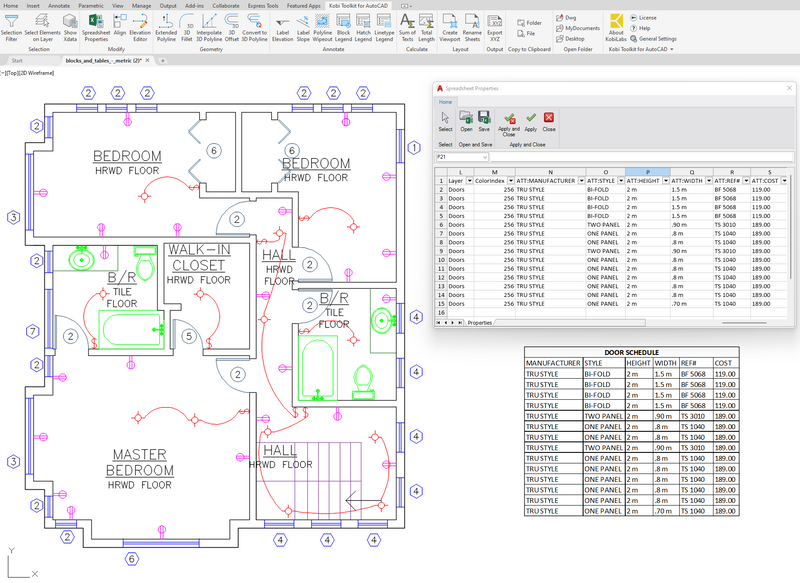
Some of our most popular tools included in the Kobi Toolkit for AutoCAD: * Spreadsheet Properties - A powerful tool to edit entity properties in an Excel-like spreadsheet. Take advantage of Excel functionalities to manipulate properties and push changes back to the drawing. * Extended Polyline - With the Extended Polyline command, you can now create a 3D Polyline by continuously defining its elevation, grade, or arc. * Elevation Editor - Review and edit the elevations or grades of different vertices of your 3D Polyline. * 3D Offset - Command similar to AutoCAD/BricsCAD offset with the option to define vertical offset. Works also on 3D Polylines. * Annotate Tools - The annotation tools allow you to label elevation and slope, as well as improve visibility using Polyline Wipeout. With just a few clicks, you can also create various types of legends, including Block Legend, Hatch Legend, or Linetype Legend. * Layout Tools - Use Create Viewport to define paper size, margins, and scale. The a
In Depth
Kobi Toolkit for AutoCAD provides productivity and automation tools for CAD workflows. AI enhances the toolkit with automated drawing analysis and standards checking.
Tool Details
Single License
10 Pack
50 Pack
Yes, 7-30 days
United States
Nomic Use Cases
See how Nomic applies this in production AEC workflows:
Frequently Asked Questions
Some of our most popular tools included in the Kobi Toolkit for AutoCAD: * Spreadsheet Properties - A powerful tool to edit entity properties in an Excel-like spreadsheet. Take advantage of Excel functionalities to manipulate properties and push changes back to the drawing. * Extended Polyline - With the Extended Polyline command, you can now create a 3D Polyline by continuously defining its elevation, grade, or arc. * Elevation Editor - Review and edit the elevations or grades of different vertices of your 3D Polyline. * 3D Offset - Command similar to AutoCAD/BricsCAD offset with the option to define vertical offset. Works also on 3D Polylines. * Annotate Tools - The annotation tools allow you to label elevation and slope, as well as improve visibility using Polyline Wipeout. With just a few clicks, you can also create various types of legends, including Block Legend, Hatch Legend, or Linetype Legend. * Layout Tools - Use Create Viewport to define paper size, margins, and scale. The a
Take advantage of Excel functionalities to manipulate properties and push changes back to the drawing.
Project Research: Instantly access all project-critical information from a single search interface.