


ProPlanner
Software to improve the scheduling & planning process of any type of construction project
Definition
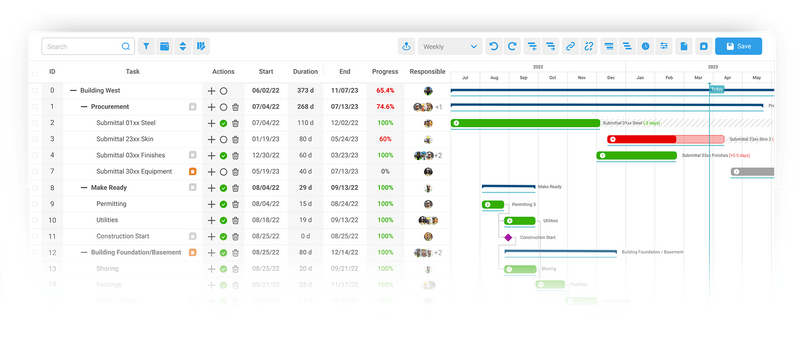
Build your Schedule in minutes instead of days:Creating schedules with ProPlanner is much easier than other tools in the market. You will have all the functionalities you need with much better usability and ease-of-use.Change activities with quick drag and drop functionality and connect predecessors/succesors with one simple click. No need for hard coding!With our construction scheduling software, anyone can build schedules from templates and update fields like dates and progress from the field.Procore Integration:With ProPlanner, you have the capability to integrate your Master Schedule with Procore by sending the latest version of your construction schedule from ProPlanner to Procore with a click of a button.Your subcontractors and your trade partners can view the latest version of your construction project schedule as quickly and frequently as you want to publish it.Multiple construction schedules in one project:The Stages feature allows you to create multiple schedules under one p
In Depth
ProPlanner provides production planning for manufacturing facilities, including offsite construction factories. AI optimizes the production schedule, line balancing, and material flow for building component manufacturing.
Tool Details
Examples
Multiple construction schedules in one project:The Stages feature allows you to create multiple schedules under one project
Stages can also be used to create a high-level construction schedule specifically for owners or other stakeholders, all within the same project
It allows the crew from the field at the Lookahead level to communicate directly to the change queue at the Master Schedule level
Nomic Use Cases
See how Nomic applies this in production AEC workflows:
Frequently Asked Questions
Build your Schedule in minutes instead of days:Creating schedules with ProPlanner is much easier than other tools in the market. You will have all the functionalities you need with much better usability and ease-of-use.Change activities with quick drag and drop functionality and connect predecessors/succesors with one simple click. No need for hard coding!With our construction scheduling software, anyone can build schedules from templates and update fields like dates and progress from the field.Procore Integration:With ProPlanner, you have the capability to integrate your Master Schedule with Procore by sending the latest version of your construction schedule from ProPlanner to Procore with a click of a button.Your subcontractors and your trade partners can view the latest version of your construction project schedule as quickly and frequently as you want to publish it.Multiple construction schedules in one project:The Stages feature allows you to create multiple schedules under one p
Multiple construction schedules in one project:The Stages feature allows you to create multiple schedules under one project. Stages can also be used to create a high-level construction schedule specifically for owners or other stakeholders, all within the same project. It allows the crew from the field at the Lookahead level to communicate directly to the change queue at the Master Schedule level.
Project Research: Instantly access all project-critical information from a single search interface.