


SectionCreator
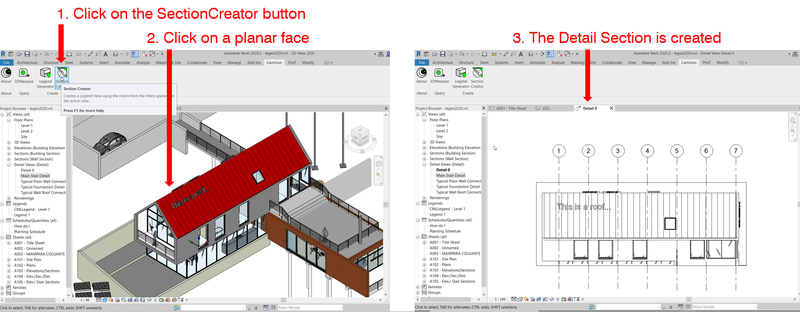
Plugin for for Revit® that creates a Section view aligned to a picked face.
Definition
Plugin for for Revit® that creates a Section view aligned to a picked face. SectionCreator is used in architecture, engineering, and construction workflows.
In Depth
SectionCreator provides tools for creating custom steel sections in structural analysis software. AI can optimize the section geometry for the specific loading conditions and design constraints.
Tool Details
Standard Subscription
Yes, 7-30 days
Examples
Using SectionCreator for BIM modeling and coordination
Creating and editing drawings with SectionCreator
Nomic Use Cases
See how Nomic applies this in production AEC workflows:
Frequently Asked Questions
Plugin for for Revit® that creates a Section view aligned to a picked face. SectionCreator is used in architecture, engineering, and construction workflows.
Using SectionCreator for BIM modeling and coordination. Creating and editing drawings with SectionCreator.
Project Research: Instantly access all project-critical information from a single search interface. Automated Drawing Review: Automatically review drawings against building codes, internal standards, and client requirements.