


Import 3D
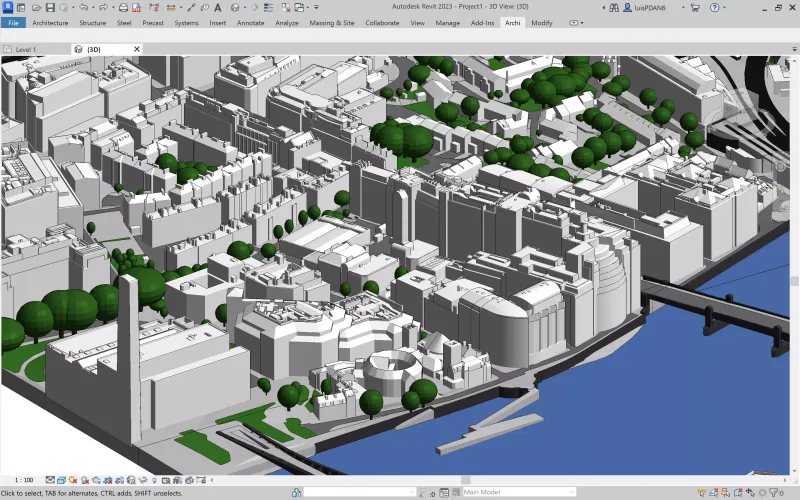
Import 3D is a Revit extension that translates external 3D models (glTF, OBJ, DAE) into native Revit geometry and materials with a single click. It auto-detects and sorts materials—preserving color and transparency—and uses highly optimized code to import thousands of faces in seconds.
Definition
Import 3D for Autodesk Revit is a robust extension engineered to translate external 3D models into native Revit geometry and material definitions. It accelerates development of custom components and detailed entourage by reusing models produced in other 3D applications or sourced from online asset libraries. This approach streamlines family creation and project setup by eliminating redundant modeling tasks and maintaining design consistency across disciplines Autodesk App StoreWith a single-click operation users can import complete mesh models including embedded materials directly into project environments or family templates. Import 3D automatically detects and groups imported geometry into existing Revit materials based on color and transparency properties. Intelligent material sorting ensures that furniture entourage mechanical parts and site elements retain their intended appearance without additional manual mapping Performance and configurability are central to the Import 3D desig
In Depth
Import 3D provides file format conversion tools for 3D models. AI enhances the conversion by intelligently mapping properties and geometry between different file formats.
Tool Details
Yes, 7 days
Norway
Examples
Using Import 3D for BIM modeling and coordination
Nomic Use Cases
See how Nomic applies this in production AEC workflows:
Frequently Asked Questions
Import 3D for Autodesk Revit is a robust extension engineered to translate external 3D models into native Revit geometry and material definitions. It accelerates development of custom components and detailed entourage by reusing models produced in other 3D applications or sourced from online asset libraries. This approach streamlines family creation and project setup by eliminating redundant modeling tasks and maintaining design consistency across disciplines Autodesk App StoreWith a single-click operation users can import complete mesh models including embedded materials directly into project environments or family templates. Import 3D automatically detects and groups imported geometry into existing Revit materials based on color and transparency properties. Intelligent material sorting ensures that furniture entourage mechanical parts and site elements retain their intended appearance without additional manual mapping Performance and configurability are central to the Import 3D desig
Using Import 3D for BIM modeling and coordination.
Project Research: Instantly access all project-critical information from a single search interface.