


iSync
iSync is an Autodesk Revit plugin that automates relinquish, save, synchronization, file compacting and license exit tasks—running continuously or on a schedule—to maximize teamwork efficiency, protect model health and reduce licensing costs.
Definition
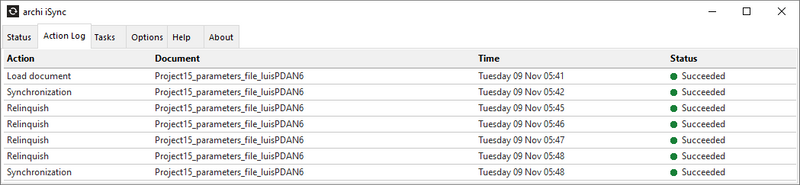
iSync is a comprehensive automation plugin for Autodesk Revit designed to streamline worksharing, file maintenance, and license management without manual intervention. Installed directly into the Revit ribbon, it runs continuously or on a user-defined schedule to perform critical operations—such as relinquishing worksets, saving local copies, synchronizing with central models, compacting files, and automatically exiting the application when idle—so teams can concentrate on design rather than administrative overhead .Once configured, iSync’s core engine monitors local and central file changes in real time. As soon as a user saves changes, the plugin preloads the latest central file, synchronizes all modifications, and relinquishes any borrowed elements. This guarantees that the central model remains up to date and that worksets are promptly released, preventing lock conflicts and ensuring uninterrupted collaboration across geographically dispersed teams .To safeguard against data loss a
In Depth
iSync provides data synchronization between construction software platforms. AI enhances the synchronization by intelligently mapping data between different platform schemas and validating the transferred data.
Tool Details
Yes, 7 days
Examples
Deployment is seamless thanks to a digitally signed custom installer that supports both desktop and virtual desktop infrastructure environments
Nomic Use Cases
See how Nomic applies this in production AEC workflows:
Frequently Asked Questions
iSync is a comprehensive automation plugin for Autodesk Revit designed to streamline worksharing, file maintenance, and license management without manual intervention. Installed directly into the Revit ribbon, it runs continuously or on a user-defined schedule to perform critical operations—such as relinquishing worksets, saving local copies, synchronizing with central models, compacting files, and automatically exiting the application when idle—so teams can concentrate on design rather than administrative overhead .Once configured, iSync’s core engine monitors local and central file changes in real time. As soon as a user saves changes, the plugin preloads the latest central file, synchronizes all modifications, and relinquishes any borrowed elements. This guarantees that the central model remains up to date and that worksets are promptly released, preventing lock conflicts and ensuring uninterrupted collaboration across geographically dispersed teams .To safeguard against data loss a
Deployment is seamless thanks to a digitally signed custom installer that supports both desktop and virtual desktop infrastructure environments.
Project Research: Instantly access all project-critical information from a single search interface.