


NonicaTab FREE
Revit® Toolbar with +10 popular tools (Room Finishing, Color Splasher, Align Tags / Views, ... )
Definition
Custom Revit® Toolbars made easy.★ Featured App of the Month at Autodesk App Store ★❝I could not believe how easy it was to use! (...) Try it. It really saves you time...❞ Carey De La Calzada, BIM Manager at WFT Eng.NonicaTab FREE allows you to customize a Revit toolbar with 12 buttons easy using our ready-to-use tools (or your own Dynamo scripts) and animated icons. Click and Go. Choose a set from our library and shape it. Small Revit tools included:Color Elements by Parameter Value.Room Finishes (Create Wall Finishes / Skirtings, Create Floor Finishes).Super Align: Align or Distribute Tags, Elements, Views, ... like in M. Word (Alignment Tool).Element Renumbering.Bulk Duplicate Sheets & Views.Bulk Rename Views & Sheets.Color Revit Tabs based on Projects / TabManager.Join Elements in Views by Categories.To 3D View / Auto-Section Box.Rotate Box, similar to pyrevit but for scope and section boxes.+20 Extra Tools. PRO members only.... (and others).NonicaTab FREE runs the tools/scripts in
In Depth
NonicaTab provides tablet-based construction field management tools. AI enhances field operations with document access, inspection forms, and progress documentation.
Tool Details
FREE FOREVER
More than 30 days
Examples
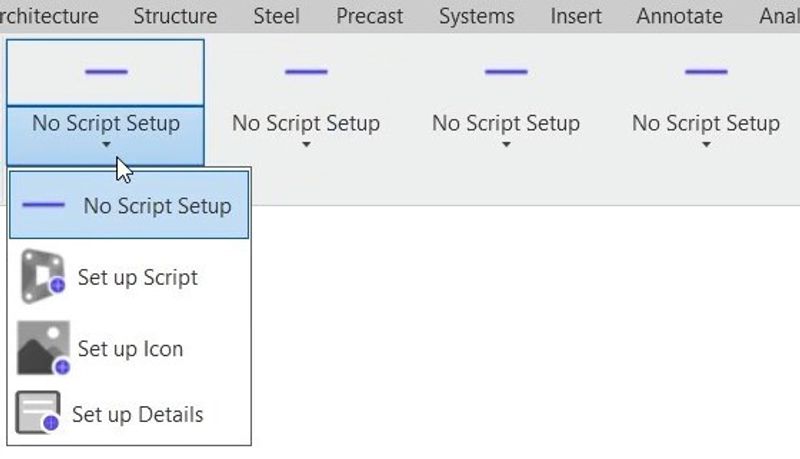
NonicaTab FREE allows you to customize a Revit toolbar with 12 buttons easy using our ready-to-use tools (or your own Dynamo scripts) and animated icons
NonicaTab FREE enables to:- Customize the names and descriptions of your Revit buttons in detail with the Set up Details button
Nomic Use Cases
See how Nomic applies this in production AEC workflows:
Frequently Asked Questions
Custom Revit® Toolbars made easy.★ Featured App of the Month at Autodesk App Store ★❝I could not believe how easy it was to use! (...) Try it. It really saves you time...❞ Carey De La Calzada, BIM Manager at WFT Eng.NonicaTab FREE allows you to customize a Revit toolbar with 12 buttons easy using our ready-to-use tools (or your own Dynamo scripts) and animated icons. Click and Go. Choose a set from our library and shape it. Small Revit tools included:Color Elements by Parameter Value.Room Finishes (Create Wall Finishes / Skirtings, Create Floor Finishes).Super Align: Align or Distribute Tags, Elements, Views, ... like in M. Word (Alignment Tool).Element Renumbering.Bulk Duplicate Sheets & Views.Bulk Rename Views & Sheets.Color Revit Tabs based on Projects / TabManager.Join Elements in Views by Categories.To 3D View / Auto-Section Box.Rotate Box, similar to pyrevit but for scope and section boxes.+20 Extra Tools. PRO members only.... (and others).NonicaTab FREE runs the tools/scripts in
NonicaTab FREE allows you to customize a Revit toolbar with 12 buttons easy using our ready-to-use tools (or your own Dynamo scripts) and animated icons. NonicaTab FREE enables to:- Customize the names and descriptions of your Revit buttons in detail with the Set up Details button.
Project Research: Instantly access all project-critical information from a single search interface.